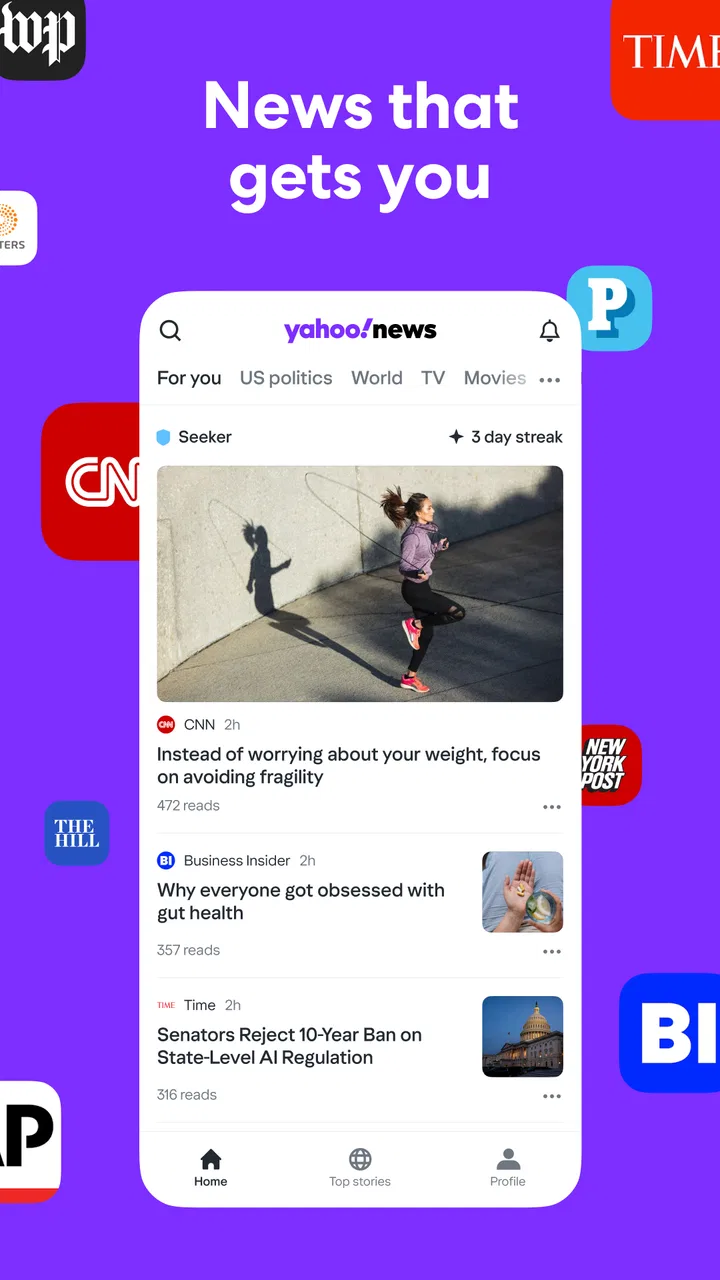
Yahoo News: Daily News For You
- 4.5
- Rating
- 10.00M
- Installs
- Free
- Price

 Analysis by App-foxy
I spent time with Yahoo News: Daily News For You as a general news and magazines app, paying particular attention to how it feels when I am not simply opening it for headlines, but deciding what information deserves my attention. That distinction matters. A news app can be convenient while still making me wonder why certain stories appear, how much control I have over the feed, and whether the service fits the way I prefer to read.
My overall impression is that Yahoo News is most useful as a broad starting point. It brings breaking stories and longer coverage into one place, and its personalized approach can make a busy news day easier to scan. At the same time, personalization is not automatically the same as editorial depth. I would use it to keep up with several subjects, discover developing stories, and decide what deserves a closer read elsewhere. I would not treat it as my only source for major decisions or complicated events.
How Yahoo News earns attention, and where trust begins
The app comes from Yahoo and sits in the News & Magazines category. It is free, carries an Everyone 10+ age rating, and has been available since October 5, 2010. Those details help explain its role: this is a mature, mainstream news product rather than a niche publication built around one topic or one editorial viewpoint.
You May Also Like

 AccuWeather: Weather Radar
AccuWeather Review: A Quick, Clear Forecast for Everyday Decisions
For everyday plans, the best forecast is the one you can understand quickly. AccuWeather makes rain timing, radar, and local conditions easy to act on, with a few trade-offs.

 Hill Climb Racing
Why Hill Climb Racing Still Turns Crashes Into One More Run
A tiny car, a bumpy hill and one more upgrade: Hill Climb Racing keeps resurfacing because its simple chaos makes every near-miss feel personal.

 AliExpress - Shopping App
AliExpress Makes Global Shopping Feel Personal, but Shoppers Bear the Risk
AliExpress turns a global marketplace into a pocket-sized discovery engine. Its reach is useful, its shopping loop compelling, and its trade-offs easy to miss.

 Lords Mobile: Kingdom Wars
Lords Mobile Is a Kingdom-Building Routine, Not a Quick Match
A case-by-case verdict on the building, battles, device demands, and social commitments that make Lords Mobile rewarding for some players and exhausting for others.

 PDF Scanner app - TapScanner
TapScanner Makes Paperwork Easier to Capture, Check, and Share
TapScanner makes scanning with a phone feel less like a rescue operation and more like a dependable step in getting work done. Its capture tools are useful, though not flawless.

 Block Blast!
 Shows How Much a Puzzle Game Can Leave Out
A quiet grid game shows why puzzle players increasingly value instant clarity, repeatable skill and low-pressure play—and where the genre still needs to catch up.
More From Our News Desk
View All News


Its scale is also easy to notice. Yahoo News has passed 10 million installs, with an average rating of 4.3 from around 245 thousand ratings and roughly 45 thousand written reviews. I see that as evidence of broad everyday use, not proof that every reader will find the same experience satisfying. A large audience usually means the app has become familiar and accessible, but it can also mean the product is designed for many different reading habits rather than for a highly specialized one.
When I judge trust in a news app, I separate three things: the reputation of the company, the quality of the individual reporting, and the amount of control given to the reader. Yahoo News benefits from being recognizable, but recognition alone does not settle whether a particular story is well sourced or whether the feed reflects my interests accurately. I still open articles, check the publisher, compare important claims, and avoid treating a headline as a complete account.
The app’s central promise is practical rather than academic. It aims to help me see important developments quickly and find coverage that matches the subjects I care about. That makes it useful during a commute, between appointments, or at the beginning of the day when I want orientation before committing to a longer reading session.
A sensible role in a daily news routine
I found the strongest use case to be a two-step routine. First, I scan the feed for the main developments and note which items affect my interests. Then I slow down for the few stories that actually matter, reading beyond the first headline and checking how different outlets frame the same event. Yahoo News works well for the first step because a personalized feed reduces the effort of searching across many separate publications.
For example, imagine I have ten minutes before work and want to know whether anything significant happened overnight. I can use the app to look across general news, technology, business, or other subjects that I follow. If a story affects a purchase, a financial choice, travel, or a civic decision, I would not stop at the first summary. I would open the full article, look at its source, and compare it with another reliable publication. The app saves discovery time; it does not remove the need for judgment.
That workflow is more valuable than endlessly scrolling. A personalized feed can encourage passive reading, especially when one headline leads naturally to another. I get better results when I decide what I am checking before opening the app, then leave once I have found the relevant material. This small habit keeps the service from becoming background noise.
People who want a single publication’s voice may prefer a newspaper or magazine app instead. A dedicated publication usually offers a clearer editorial identity and a more consistent depth of coverage. Yahoo News is better suited to readers who want variety and convenience, especially when they are still learning which sources they trust.
What the current version means for compatibility
The current version is 89.2, and the listed minimum operating system is Android 7.0. That makes the app accessible to people using older Android devices, although compatibility does not guarantee that every phone will feel equally quick or comfortable. On a smaller or aging handset, reading long articles and moving through a busy feed may be less pleasant than on a newer screen.
I would check the app’s behavior on the device I actually plan to use rather than assuming that broad compatibility means an identical experience everywhere. News reading is especially sensitive to screen size, text rendering, loading speed, and notification behavior. A product can be technically available while still being inconvenient for someone who reads for long periods.
The free price is a clear advantage for casual readers. I can try it without making a subscription decision first, which lowers the barrier to testing the feed and deciding whether the selection suits me. The trade-off is that a free, broad news service may not provide the same focused, publication-specific experience as a paid source built around a dedicated newsroom and a defined audience.
Looking at controls instead of guessing about privacy
My trust assessment stays deliberately practical. I do not assume that an app is private or invasive simply because it personalizes content, and I do not assume that it is harmless because it is familiar. I look at the permissions and privacy choices shown on my own device and in the app’s current settings, then decide whether the exchange feels acceptable for my use.
That is important with Yahoo News because a tailored feed is only useful when I understand what choices I can make around it. Before settling into regular use, I would review notification controls, account options, and any visible settings related to personalization or data. If the app presents a choice, I want that choice to be understandable rather than something I accept automatically just to reach the headlines.
I also recommend checking the Android permission manager after installation. The operating system provides a direct view of permissions granted to an app, and that is more reliable for my device than relying on assumptions about what a news application might request. I keep only the access I am comfortable with, and I revisit the screen after major updates if the app’s behavior changes.
This is not a criticism unique to Yahoo News. It is a sensible routine for any personalized service. The useful point is that trust should come from visible controls and informed decisions, not from a vague feeling that a well-known brand must handle every concern automatically.
Notifications can help or quietly take over
Breaking news alerts are one of the app’s most useful functions when I genuinely need timely updates. They can save me from repeatedly checking several websites during a developing event. But alerts also have the greatest potential to interrupt my day, so I would configure them carefully rather than leaving every available notification enabled.
My preferred approach is to keep alerts for genuinely important developments and disable anything that feels like routine feed promotion. If the settings offer separate choices, I would make the distinction there; if they do not, I would use the phone’s notification controls to reduce interruptions. A news app becomes less helpful when every alert receives the same urgency, because the important ones start to blend into the background.
There is a second trust issue here: an alert is a prompt to read, not a finished explanation. Breaking coverage can change quickly, and the first wording may be shorter or less qualified than the article itself. I open the story when the subject matters, check the publisher, and wait for fuller context before repeating a claim. That habit protects me from reacting to a notification as if it were a complete report.
For someone who finds news stressful, I would consider using the app at planned times with notifications limited or off. The service can still work as an on-demand reader. This is a useful example of user agency: I can choose whether the app sets the rhythm of my day or simply waits until I ask for information.
Personalization is helpful, but it can narrow the view
The tailored feed is convenient because it reduces the amount of searching I need to do. If I regularly follow a few subjects, the app can make those areas easier to reach and help me notice related coverage. This is particularly useful for a reader who wants a mixture of general news and personal interests without installing a separate application for every topic.
The weakness is familiar but significant: a feed optimized around my interests may show me less of what I have not selected. I would not use personalization as a substitute for a deliberate overview of the wider news cycle. Once or twice a week, I would intentionally look beyond my usual subjects and read from sources with different editorial approaches. That small correction helps prevent the feed from becoming a comfortable but incomplete picture.
Another useful tactic is to treat repeated coverage as a signal to investigate, not as confirmation. Seeing the same event several times can mean it is important, but it can also reflect the way a story is being distributed. I look for the original reporting, distinguish analysis from news, and pay attention to whether several articles are actually adding different facts or merely repeating one another.
This is where Yahoo News compares differently with a traditional newspaper app. A newspaper may give me a planned front page and a stable editorial hierarchy. Yahoo News gives me more variety and a more flexible starting point, but I have to take more responsibility for deciding what deserves priority and which source is strongest.
Account choices and reading habits
Before creating or using an account, I would examine the choices shown during sign-in and in the account area. I want to know which parts of the experience require an account, what settings are available, and whether I can adjust the feed without handing over more information than I consider necessary. The right decision depends on how much personalization I want and how comfortable I am managing a connected service.
I also separate convenience from dependence. If I save preferences or build a familiar feed, that can make Yahoo News feel more useful over time. But I still keep a few independent sources in my routine so that my understanding does not rely on one app’s selection. This is especially important for public affairs, health information, financial news, and emergencies, where missing context can matter more than saving a few seconds.
For families, the Everyone 10+ rating is a helpful signal to consider, but I would still look at the actual stories appearing in the feed. News changes constantly, and an age label does not tell me whether every article will suit a particular child. I would use the device’s broader parental controls and discuss how to evaluate headlines rather than assuming the rating answers every question.
Readers who want a calm, long-form experience may find the stream-oriented design less satisfying than a magazine subscription. People who dislike alerts, personalization, or frequent source switching may also prefer a single publication. On the other hand, someone who wants a free way to survey many subjects will likely appreciate the flexibility more than the lack of a single editorial voice.
Where the app is strongest in comparison
Compared with checking a browser full of separate news sites, Yahoo News offers a simpler starting point. I do not have to remember every publication before I know what is happening. That convenience is its strongest practical advantage, especially for readers who want breadth but do not want to build a complicated system of bookmarks and subscriptions.
Compared with a social network, it is a more intentional place to begin reading. Social feeds mix reporting with commentary, personal posts, and highly reactive discussion. Yahoo News can make it easier for me to move directly from a headline to an article, although I still need to inspect the source and avoid confusing aggregation with verification.
Compared with a specialist app, its breadth is also its limitation. A dedicated business, sports, science, or local-news service may provide more expert context in that field. I would choose Yahoo News as a general dashboard, then add a specialist source when a subject becomes important enough to deserve deeper attention.
My cautious verdict for different readers
I recommend Yahoo News to readers who want a free, broad news app for daily discovery and breaking updates. It is a good fit if I want one place to scan several interests, adjust my reading routine, and follow links into fuller coverage. The large user base and established developer make it an easy product to try, but I still judge each story and each privacy choice on its own merits.
I would skip it as a primary news source if I need one publication’s consistent editorial standards, extensive local reporting, or a quiet long-form reading environment. I would also look elsewhere if personalized feeds make me feel trapped in a narrow information bubble. In those cases, a dedicated publication, a specialist source, or a deliberately mixed set of websites may serve me better.
The most responsible way to use it is to keep control of the relationship: review visible permissions and account settings, limit alerts to the level I actually need, check the source behind important headlines, and occasionally read outside my usual interests. Yahoo News is most trustworthy as a discovery and monitoring tool when I remain an active editor of my own feed.
After using it, I see a capable general news companion rather than a complete replacement for careful reading. Its free access, broad reach, and tailored discovery make it practical for everyday awareness. Its limitations are tied to the same design: personalization can narrow attention, alerts can interrupt, and variety does not guarantee depth. If I use those strengths deliberately and keep those trade-offs in view, Yahoo News earns a place in my routine without becoming the only voice I hear.
For readers comparing options, my short advice is simple: choose this app when convenience and breadth matter most, choose a publication-specific service when depth and editorial consistency matter more, and use both when the story deserves more than a quick scan. That balance gives Yahoo News a useful role while preserving the judgment that good news consumption still requires.
FAQs for Yahoo News: Daily News For You
01What features does Yahoo News: Daily News For You offer?
Yahoo News provides a personalized news experience by curating stories based on your interests. The app offers news from reliable sources, live video coverage, and breaking news alerts. Users can customize their news feed and receive updates on topics they care about, making it a versatile tool for staying informed.
02Is Yahoo News: Daily News For You free to use?
Yes, Yahoo News is free to download and use. However, the app may feature advertisements, which help support the platform. Users can access a wide range of news articles and videos without any subscription fees, making it an accessible option for news enthusiasts.
03How does Yahoo News ensure the reliability of its news sources?
Yahoo News aggregates content from a variety of reputable sources, ensuring diverse perspectives and accurate reporting. The app partners with leading news organizations to provide users with trustworthy and up-to-date information. This commitment to quality helps users stay informed with reliable news coverage.
04Can I customize the news topics I see on Yahoo News?
Yes, Yahoo News allows users to personalize their news feed by selecting topics that interest them. This customization feature ensures that users receive news articles and updates relevant to their preferences, enhancing the overall experience and making it easier to stay informed about specific subjects.
05Does Yahoo News offer offline reading capabilities?
Currently, Yahoo News does not have a built-in offline reading mode. Users need an internet connection to access the latest articles and videos. For uninterrupted access to content, it is recommended to have a stable internet connection when using the app.
Pros
- User-friendly interface for easy navigation.
- Customizable news feed to match interests.
- Real-time notifications for breaking news.
- Wide range of news categories available.
- Offline reading mode for convenience.
Cons
- Occasional ads can disrupt reading flow.
- Requires internet for real-time updates.
- Limited personalization for local news.
- Some articles may have biased viewpoints.
- Notifications can become overwhelming.

Yahoo News: Daily News For You
Gallery